


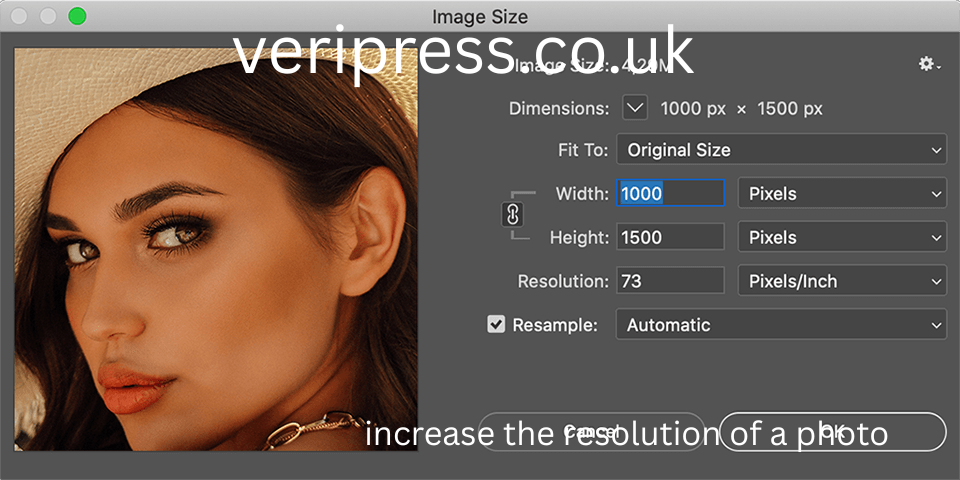
Photo resolution plays a crucial role in how images appear on screens, in print, and across digital platforms. Whether you are a photographer, designer, content creator, student, or casual user, you may eventually need to increase the resolution of a photo. This need often arises when an image looks blurry, pixelated, or unsuitable for printing or professional use.
Increase the Resolution of a Photo is not just about making an image bigger. It involves improving clarity, detail, and visual quality while minimizing distortion. This article explains what photo resolution really means, why increasing it can be challenging, and the most effective methods to improve image resolution accurately and responsibly.
Understanding Photo Resolution
Photo resolution refers to the amount of detail an image contains. It is usually measured in pixels, expressed as width by height, such as 1920 by 1080 pixels. The higher the number of pixels, the more detail the image can display.
Resolution also affects print quality. For printed images, resolution is often measured in pixels per inch. A higher pixels-per-inch value results in sharper prints, while lower values may appear blurry or pixelated.
Understanding resolution is the first step toward improving it effectively.
Resolution vs Image Size
Resolution and image size are related but not the same. Image size refers to the physical dimensions of the image, such as inches or centimeters, while resolution refers to pixel density.
An image can be large in size but low in resolution, or small in size but high in resolution. Increase the Resolution of a Photo resolution means adding or enhancing pixel data, not simply enlarging the image dimensions.
Confusing these concepts often leads to poor results when attempting to improve image quality.
Why Increasing Resolution Is Challenging
When a photo is taken, the camera captures a fixed amount of data. Increasing resolution later means adding new pixel information that did not originally exist. This is why Increase the Resolution of a Photo resolution is not a perfect process.
Traditional methods rely on algorithms to estimate what new pixels should look like based on surrounding pixels. While modern technology has improved this process significantly, there are still limitations, especially with heavily compressed or very small images.
Understanding these limits helps set realistic expectations.
When You Should Increase Photo Resolution
There are several common situations where increasing photo resolution is useful. Printing photos in large formats often requires higher resolution. Professional design projects may demand sharper images. Old photos scanned at low quality may need enhancement. Online platforms sometimes require specific resolution standards.
In each case, the goal is to improve clarity without introducing artifacts or distortion.
Increasing Resolution Using Image Editing Software
One of the most common ways to increase photo resolution is through image editing software. These programs allow users to resize images and apply algorithms that smooth and sharpen details.
When increasing resolution manually, it is important to use gradual adjustments rather than drastic size changes. Incremental increases help preserve detail and reduce visual artifacts.
Editing software often provides options such as resamplingIncrease the Resolution of a Photo, interpolation, and sharpening to refine results.
Understanding Resampling and Interpolation
Resampling is the process of changing the number of pixels in an image. Interpolation refers to how new pixels are created during this process.
Common interpolation methods include nearest neighbor, bilinear, and bicubic. More advanced methods analyze surrounding pixels to predict new values more accurately.
Choosing the right interpolation method can significantly affect image quality when increasing resolution.
Using Artificial Intelligence for Resolution Enhancement
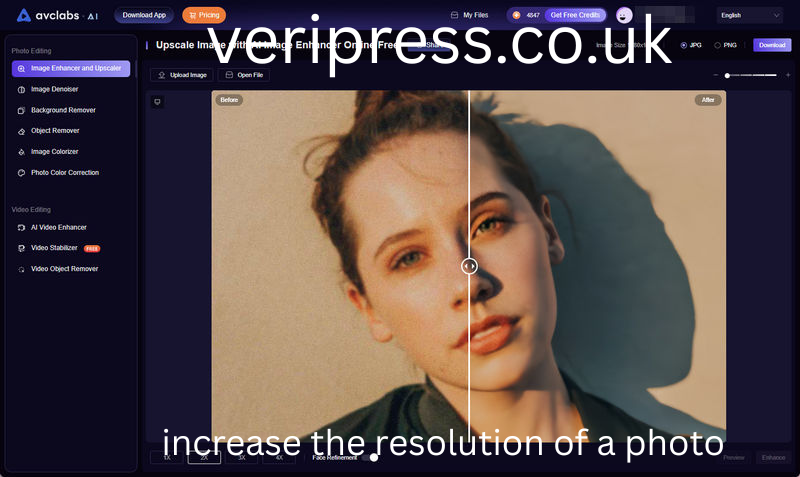
Artificial intelligence has transformed how photo resolution can be increased. AI-based tools analyze patterns, textures, and structures in images to generate new details more intelligently.
Unlike traditional methods, AI does not simply stretch pixels. Instead, it learns from large datasets to recreate realistic textures, edges, and details.
AI resolution enhancement is especially effective for portraits, landscapes, and detailed objects.
Upscaling Images Without Losing Quality
Upscaling refers to increasing image resolution while maintaining acceptable quality. To upscale successfully, start with the highest-quality original image available.
Avoid repeated resizing, as this compounds quality loss. Apply noise reduction before upscaling and sharpening afterward to enhance edges.
Controlled upscaling produces better results than aggressive resizing.
Increasing Resolution for Printing
Printing requires higher resolution than digital display. Images intended for print should typically have higher pixels-per-inch values to ensure sharp results.
Before increasing resolution for print, consider the print size and viewing distance. Large posters viewed from afar require less detail than small prints viewed up close.
Adjusting resolution based on print requirements helps optimize quality.
Improving Resolution of Old or Scanned Photos
Old photographs and low-quality scans often benefit from resolution enhancement. Begin by cleaning the image through dust removal, noise reduction, and color correction.
Once restored, resolution can be increased more effectively. AI-based tools are particularly useful for restoring old photos while enhancing detail.
This approach preserves the original character while improving clarity.
Increasing Resolution on Mobile Devices
Mobile apps now offer resolution enhancement features, making it easier to improve photos directly from smartphones. These tools often use cloud-based or on-device AI to upscale images quickly.
While convenient, mobile tools may offer less control Increase the Resolution of a Photothan desktop software. For critical projects, more advanced tools are recommended.
Still, mobile solutions are useful for everyday needs.
Enhancing Resolution for Online Use
For online platforms, resolution requirements vary. Social media platforms often compress images, which can reduce quality.
Increasing resolution before uploading can help counteract compression, but excessive upscaling may be unnecessary. Optimizing resolution for each platform ensures images look their best without wasting resources.
Understanding platform guidelines improves results.
Common Mistakes When Increasing Resolution
One common mistake is enlarging images too much at once. This often results in blurry or artificial-looking photos.
Another mistake is over-sharpening, which creates halos and unnatural edges. Ignoring noise reduction can also make imperfections increase the resolution of a photo more visible after upscaling.
Careful adjustments and moderation are key to success.
The Role of File Formats in Resolution
File format affects image quality and resolution handling. Lossy formats compress data, which can reduce detail. Lossless formats preserve more information and are better for resolution enhancement.
When increasing resolution, work with the highest-quality format available. Save final versions appropriately based on intended use.
Choosing the right format supports better results.
How Camera Settings Affect Future Resolution
The best way to ensure high resolution is to capture it correctly from the start. Using higher camera resolution settings, proper lighting, increase the resolution of a photo and sharp focus reduces the need for later enhancement.
Shooting in formats that preserve more data allows for better editing flexibility.
Good capture practices minimize the need for resolution correction.
Ethical and Realistic Expectations
While technology can significantly improve image resolution, it cannot create true detail where none exists. Understanding this increase the resolution of a photo helps avoid unrealistic expectations.
Resolution enhancement should aim to improve usability and appearance, not misrepresent reality. Ethical use is especially important in journalism, legal contexts, and documentation.
Responsible enhancement maintains integrity.
Resolution Enhancement in Professional Fields
In professional fields such as design, marketing, medicine, and research, resolution quality is critical. High-resolution images support accuracy, credibility, and effectiveness.
Professionals often rely on advanced tools and workIncrease the Resolution of a Photoflows to maintain quality standards.increase the resolution of a photo
Understanding resolution principles improves professional outcomes.
Future Trends in Image Resolution Technology
Resolution enhancement continues to evolve. Advances in artificial intelligence and machine learning are making upscaling faster, smarter, and more realistic.
Future tools may adapt dynamically Increase the Resolution of a Photo to different image types, further reducing artifacts and improving realism.
As technology improves, resolution enhancement will become more accessible and reliable.
Practical Tips for Best Results
Always start with the best source image available. increase the resolution of a photo gradually. Use noise reduction before upscaling and sharpening after. Preview results at full size.
Test different methods and compare outcomes. Save multiple versions to preserve flexibility.
These practices lead to better results over time.
Conclusion
Increasing the resolution of a photo is both a technical and creative process. It requires understanding what resolution means, recognizing its limitations, and applying the right tools and techniques thoughtfully.
Whether enhancing images for print, restoring old photos, or preparing visuals for digital platforms, careful resolution improvement can significantlIncrease the Resolution of a Photoy enhance image quality.
By combining proper techniques with realisIncrease the Resolution of a Phototic expectations, anyone can improve photo resolution effectively and responsibly, achieving clearer, sharper, and more visually appealing images.
